Your nonprofit avoids vendor lock-in by choosing IT services with month-to-month contracts, open data formats that export cleanly, and technology built on widely-supported platforms rather than proprietary systems. Insist on documented access credentials, regular backup exports you control, and service agreements that explicitly permit migration—ideally with 30-day termination clauses that protect your organization’s flexibility when funding or needs change.
Why do nonprofits get trapped with IT vendors they can’t leave?
The trap usually starts when you’re desperate. Your donor management system crashes three days before a year-end mailing, or your board demands better cybersecurity before the next grant application. A vendor promises to solve everything quickly, and you sign whatever agreement gets your systems running again.
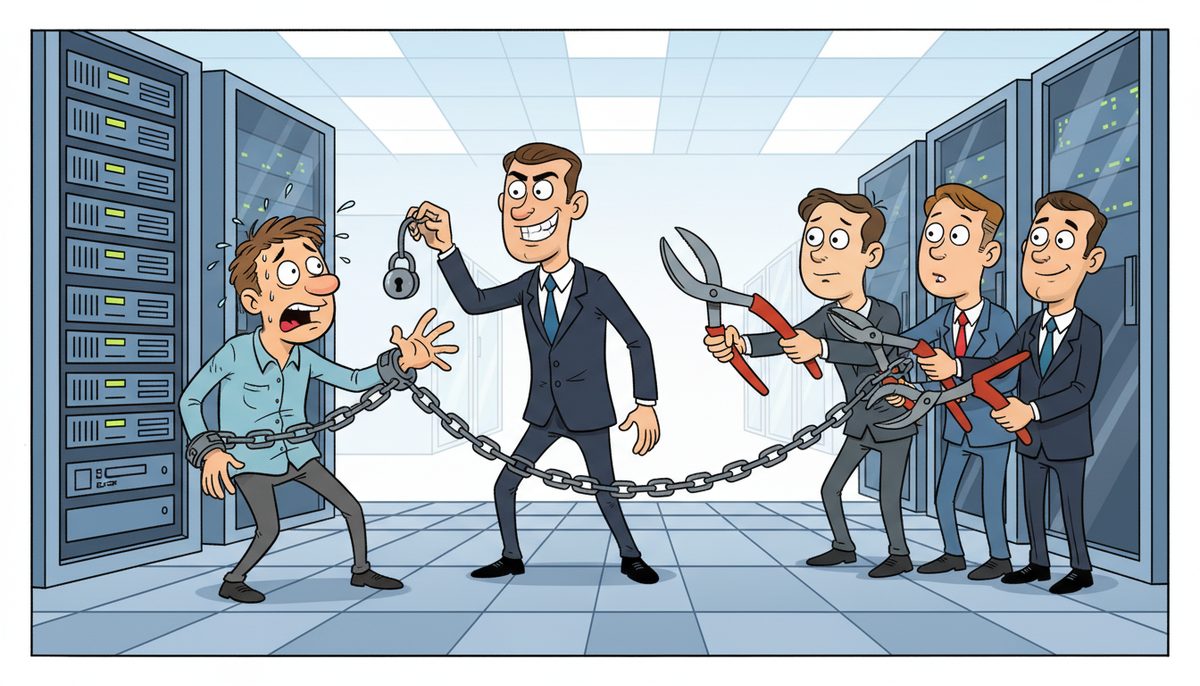
Six months later, you discover your donor data lives in a proprietary format that costs thousands to export. Your email system only works with their specific backup solution. The contract you signed auto-renews annually with 90-day cancellation notice, and the cancellation window already passed.
The real villain isn’t the technology itself—it’s the dependence built into how it’s sold. Vendors design lock-in deliberately: custom integrations that only they can maintain, data formats that don’t export to standard files, and infrastructure that requires their specific expertise to operate.
For Victoria nonprofits operating under BC’s PIPA requirements, this dependence becomes dangerous. When you can’t access or move donor data, you can’t comply with privacy regulations that require you to demonstrate control over personal information. You’re stuck explaining to the Privacy Commissioner why a vendor controls data you’re legally responsible for protecting.
What happens when your nonprofit can’t switch IT providers?
You watch costs climb while service quality drops. The vendor knows you can’t leave, so your renewal rates increase 15-20% annually while response times stretch from hours to days. Your operating budget bleeds money that should fund program delivery.
Grant opportunities slip away because you can’t meet technical requirements. A community foundation asks for cybersecurity attestations your current vendor won’t provide. BC Gaming grant applications require specific financial system documentation your vendor charges $2,500 to generate. United Way wants proof of data protection policies, but your vendor owns the systems and won’t share technical details.
When a real crisis hits—a data breach, a system failure during your December campaign, a CRA audit—you’re completely dependent on a single company’s timeline and priorities. If they’re busy with larger clients or simply don’t care about your deadline, your organization suffers while you have zero alternatives.
Victoria nonprofits locked into proprietary systems report spending 23-35% of their technology budget on vendor-specific requirements that don’t directly serve their mission.
Board members start asking hard questions about why technology decisions are limiting organizational strategy. Why can’t you integrate with the volunteer management system other chapters use? Why does switching to a better donor platform require rebuilding everything from scratch?
Which contract terms create vendor lock-in for nonprofits?
Multi-year agreements with early termination penalties trap you immediately. A three-year contract with 50% buyout fees means you’re paying for services you’re not using just to escape. Your organization with fluctuating grant funding can’t afford to pay double—current vendor plus new provider—during transitions.
Auto-renewal clauses with narrow cancellation windows catch organizations by surprise. You must provide written notice 90 days before the annual renewal date, but that date passed two months ago. Now you’re locked in for another full year regardless of service quality or budget constraints.
Bundled services that can’t be separated force you to buy everything or nothing. You only need email security, but the vendor requires you to purchase their backup solution, help desk services, and monitoring package as one non-divisible contract. When one component fails or becomes too expensive, you can’t replace just that piece.
Data export fees and format restrictions are the most insidious lock-in mechanism. The contract promises you own your data, but extracting it costs $150 per hour of vendor time. Worse, they’ll only export to their proprietary format, not the CSV or XML files your new donor management system requires. You’re technically free to leave—you just can’t take your donor records, financial history, or program data with you in usable form.
Intellectual property clauses that claim ownership of configurations, custom reports, or integration work mean everything built during the relationship stays with the vendor. The custom financial reports your board relies on? The integration between your donor system and accounting software? All vendor property that disappears when you leave.
How do you evaluate IT services for portability before signing?
Start by asking what happens when you leave—before you arrive. Request a written data export procedure that specifies formats, timelines, and costs. If the vendor hesitates or provides vague answers, you’re looking at lock-in by design.
Test data portability during the trial or onboarding phase. Ask for a sample export of your data in the first 30 days. Verify you can open it in standard applications without specialized software. Check that donor records include all custom fields, gift history exports contain transaction details, and file attachments come with original filenames and folder structures.
Examine the underlying technology platforms. Services built on Microsoft 365, standard Linux servers, or widely-adopted database systems (PostgreSQL, MySQL, SQL Server) offer inherent portability. You can find qualified technicians anywhere on Vancouver Island who understand these platforms. Proprietary systems or heavily customized platforms mean you’re dependent on vendor-specific expertise.
Review credential and access policies carefully. You should receive and control administrator passwords, encryption keys, domain registrations, and cloud account credentials. If the vendor insists on being the only administrator or won’t share root access, they’re building dependence into the infrastructure.
Insist on monthly or quarterly contracts, especially when your organization is testing a new service relationship. Month-to-month agreements cost slightly more per month but eliminate the risk of being trapped in a failing relationship. For Vancouver Island nonprofits with seasonal revenue tied to tourism cycles, this flexibility protects you when summer donations drop and winter expenses rise.
Document everything in writing before signing. Email confirmations and verbal promises disappear during disputes. Get export procedures, termination terms, data ownership, and transition assistance commitments in the actual service agreement, not a separate document the vendor can later claim doesn’t apply.
What technology choices reduce dependence on any single vendor?
Choose cloud services over on-premise systems that require vendor-specific hardware. Microsoft 365, Google Workspace, and major donor management platforms (Bloomerang, DonorPerfect, Little Green Light) run in standard web browsers and export data in universal formats. You’re not locked to specific servers or equipment that only one company can service.
Prioritize open standards and common file formats throughout your technology stack. Donor data in CSV files, documents in PDF and Office formats, financial records in QuickBooks or Xero—these formats work with hundreds of different applications and service providers. Proprietary databases and custom file types create artificial switching costs.
Separate your data storage from your IT support services. Your backup solution shouldn’t require your help desk provider to restore files. Your donor database shouldn’t live on infrastructure only one vendor can access. When services are modular, you can replace the help desk without touching your backup system, or switch backup providers without disrupting daily operations.
Maintain your own administrative access to critical systems. You should be able to add users, reset passwords, run reports, and export data without calling your IT provider. Vendors who insist on controlling all administrative functions are building dependence, not providing service.
For Vancouver Island nonprofits, local support matters differently than vendor lock-in. Working with Victoria-based technicians who understand BC’s PIPA requirements and can reach your office without ferry delays isn’t lock-in—it’s practical infrastructure. The difference is whether you’re locked in by contract terms and proprietary technology, or choosing local support because it serves your mission better.
Mike Carmel, who runs a technology services business, describes this distinction clearly: “As the owner of a unique mobile computer services business, I specialize in providing technical support and services for a wide range of clients. However, when it comes to enterprise-level IT needs, DataStream Networks is my trusted referral partner.” He’s not locked in—he chooses to refer larger projects to a local provider whose capabilities complement his own work, maintaining flexibility while accessing specialized expertise when clients need it.
How does a local IT partner help without creating new dependencies?
You know the anxiety of handling sensitive donor credit card information and beneficiary data without a full-time IT person, wondering if you’re meeting PIPA requirements or risking everything. You’ve watched Victoria nonprofits stuck waiting for mainland technicians during BC Gaming grant deadlines while board members ask why technology problems are threatening funding.
DataStream Networks has served Vancouver Island organizations since 2012 with a specific commitment: live people answer phones with no voicemail, phone tree, or long wait times. When your donor system crashes before a campaign deadline, you talk to a real local technician immediately—someone in Victoria, Nanaimo, Duncan, or Cobble Hill who understands nonprofit technology needs and can respond without ferry delays.
Most problems get fixed remotely within minutes, and when on-site work is necessary, a technician is automatically dispatched to your location. This isn’t lock-in—it’s responsive local support built on standard platforms you could move elsewhere if your needs changed.
The services are structured to avoid dependence. Managed IT services run $150–$225 per user per month with agreements that protect your flexibility, not trap you in multi-year commitments. Co-managed IT support costs $50–$150 per user monthly, working alongside your existing volunteer tech help rather than replacing them entirely.
The approach builds capability within your organization rather than creating dependency. You receive documentation, administrative access, and training that let your staff handle routine tasks. Support is there when you need expertise, not because you’re locked out of your own systems.
Three steps to technology independence for your nonprofit
- Call (250) 929-0745 to talk to a real Victoria technician about your current IT setup, existing contracts, and where vendor lock-in might already exist in your technology stack.
- Get a clear assessment of which systems you truly control versus which create dependence, with specific recommendations for increasing portability without disrupting current operations or upcoming campaign deadlines.
- Implement changes gradually—starting with the highest-risk dependencies—using month-to-month service agreements and open platforms that protect your organization’s flexibility as funding and needs evolve.
What does technology freedom look like for a Victoria nonprofit?
You process December donations smoothly, knowing your donor data exports cleanly to standard formats you control. When grant applications require cybersecurity attestations, you provide them immediately because you have full administrative access to your own systems and documentation.
Your board reviews technology costs annually and makes strategic decisions based on mission fit, not contractual obligations. If a better donor management platform emerges, you can evaluate it honestly without facing $10,000 in data migration penalties or losing three years of gift history.
When your IT provider’s service quality drops or costs increase unreasonably, you have options. Your data, credentials, and systems documentation let you switch providers in weeks, not months. You negotiate from strength because both parties know the relationship continues by choice, not contractual force.
CRA audits don’t create panic because your financial records live in standard formats with multiple backup copies you control. PIPA compliance is straightforward because you can demonstrate exactly where donor data resides, who accesses it, and how it’s protected—without depending on a vendor to provide that information.
Most importantly, technology serves your mission instead of constraining it. You choose tools and services based on what helps you serve your community better, not what your current vendor happens to offer or which systems you’re contractually obligated to keep using.
If you’re currently trapped in vendor lock-in or want to avoid it entirely, talk to a Victoria technician who can assess your specific situation and recommend practical steps toward technology independence. Call (250) 929-0745 to speak with someone immediately—no voicemail, no phone trees, just direct answers about protecting your nonprofit’s flexibility while maintaining reliable IT support on Vancouver Island.
Frequently asked questions
How long should an IT service contract be for a nonprofit?
Month-to-month or quarterly contracts provide the best protection against vendor lock-in for nonprofits with fluctuating grant funding. Annual contracts are acceptable only if they include 30-day termination clauses without penalties, explicit data export procedures at no additional cost, and clear documentation of what you own versus what the vendor controls. Avoid multi-year agreements unless they offer significant cost savings that your board has explicitly approved as worth the reduced flexibility.
Can we switch IT providers without losing our donor data?
Yes, if your current systems use standard data formats and your contract doesn’t restrict exports. Before switching, request a complete data export in CSV, XML, or database backup formats and verify you can open files without vendor-specific software. Most modern donor management systems (Bloomerang, DonorPerfect, Little Green Light) export cleanly to formats new providers can import. Proprietary systems may require paid migration assistance, so clarify export costs and formats before signing with any provider.
What questions should we ask IT vendors about vendor lock-in?
Ask directly: “What happens when we leave, and what does it cost?” Request written data export procedures specifying formats, timelines, and fees. Ask who owns administrator credentials, custom configurations, and integration work. Inquire about contract length, auto-renewal terms, cancellation notice periods, and early termination penalties. Request references from organizations that have successfully migrated away from their services. Vendors confident in their service quality answer these questions clearly; evasive responses indicate lock-in by design.
Do we need different IT providers for different services to avoid lock-in?
Not necessarily—multiple vendors create coordination complexity nonprofits often can’t manage efficiently. The key is ensuring each service uses portable technology and independent credentials. One provider can deliver help desk, backup, and security services without creating lock-in if systems are built on standard platforms, you control administrator access, data exports freely, and contracts allow monthly termination. Bundling services with a single vendor offers efficiency; forced bundling that prevents replacing individual services creates lock-in.
How much does it cost to escape vendor lock-in once you’re trapped?
Costs vary dramatically based on contract penalties, data migration complexity, and system replacement needs. Early termination fees range from 25-50% of remaining contract value—potentially $5,000-$15,000 for nonprofits locked into three-year agreements. Data extraction and conversion can cost $2,500-$10,000 depending on database complexity and proprietary formats. System reconfiguration and staff retraining add another $3,000-$8,000. Total escape costs of $10,000-$30,000 aren’t uncommon, which is why prevention through careful contract review and portable technology choices is essential for budget-constrained nonprofits.
Are cloud services better than on-premise systems for avoiding vendor lock-in?
Cloud services generally offer better portability because data lives in accessible formats rather than on vendor-controlled hardware. Microsoft 365, Google Workspace, and cloud-based donor platforms let you export data and switch providers without replacing physical servers. However, cloud services can still create lock-in through proprietary APIs, complex integrations, and data export restrictions. The platform matters less than the contract terms, data formats, and administrative access you maintain. Well-designed on-premise systems with standard databases offer more freedom than cloud services with restrictive export policies.